Sora2 API for Video Generation Now Available!


On October 6, 2025 (local time), OpenAI's Sora video generation API and prompt guide were released. AICU AIDX Lab has already started developing working samples.
I'll generate it again. The Sora cloud logo is not included. The generation time is also quite fast, I think 1-2 minutes. pic.twitter.com/MYLnyDmtX6
— AICU - Creating Creators (@AICUai)
Loading tweet component...
?ref_src=twsrc%5Etfw">October 7, 2025Features unique to the API include the removal of the "Sora cloud mark" that was in the free version app, high-quality Sora2-Pro, simultaneous generation of sprite sheets that express the composition of scenes, and acquisition of past generation lists, making it suitable for professional use.
Actually Implemented It!
AICU AIDX Lab has actually implemented it.
Using the API requires personal authentication separate from the regular GPT-based API key. Since you will be using eKYC (electronic identity verification) using a passport and face, you need to check with the operations department in the case of corporate API use.
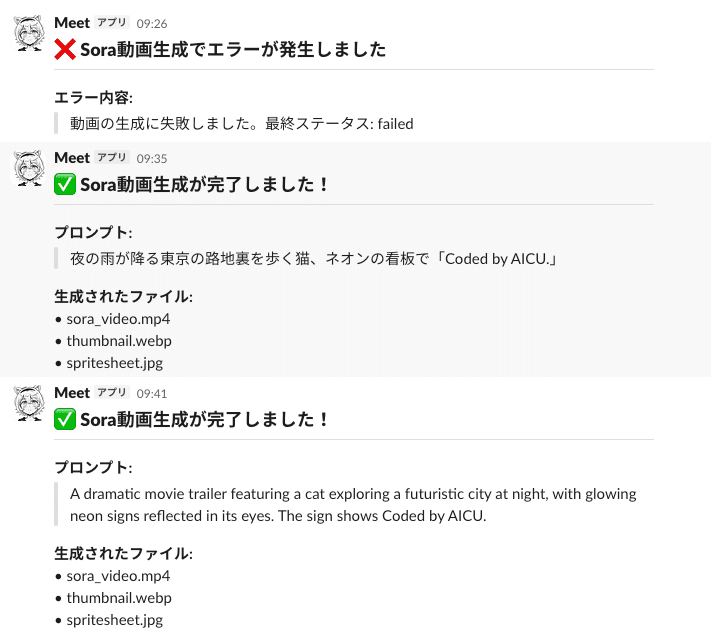
In this way, arbitrary videos can be generated by the API and notified to Slack.
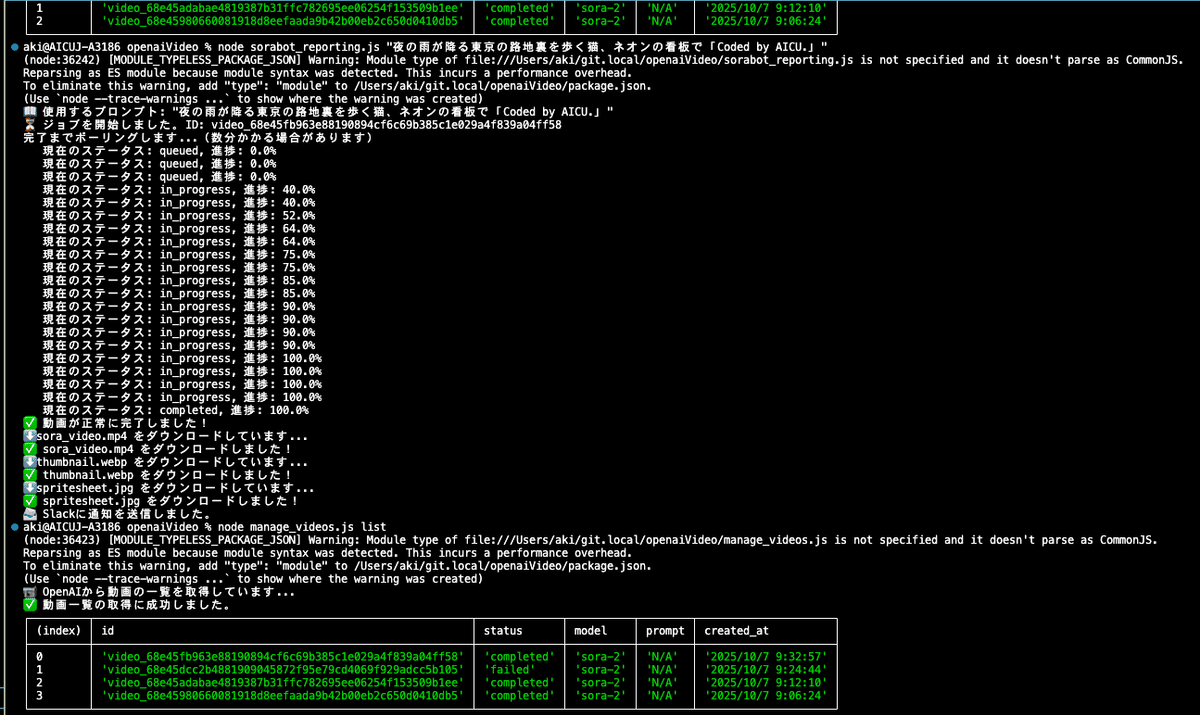
You can get a list of past generated videos. You can also see what failed.

What is the Price of the Video API?
Model Size: Output Resolution Price per second sora-2 Portrait: 720x1280 Landscape: 1280x720 $0.10 sora-2-pro Portrait: 720x1280 Landscape: 1280x720 $0.30 sora-2-pro Portrait: 1024x1792 Landscape: 1792x1024 $0.50
It's a little short of Full HD (1920x1080), so it doesn't quite feel like professional video production, but it's now possible to generate high-quality media for SNS using the API.
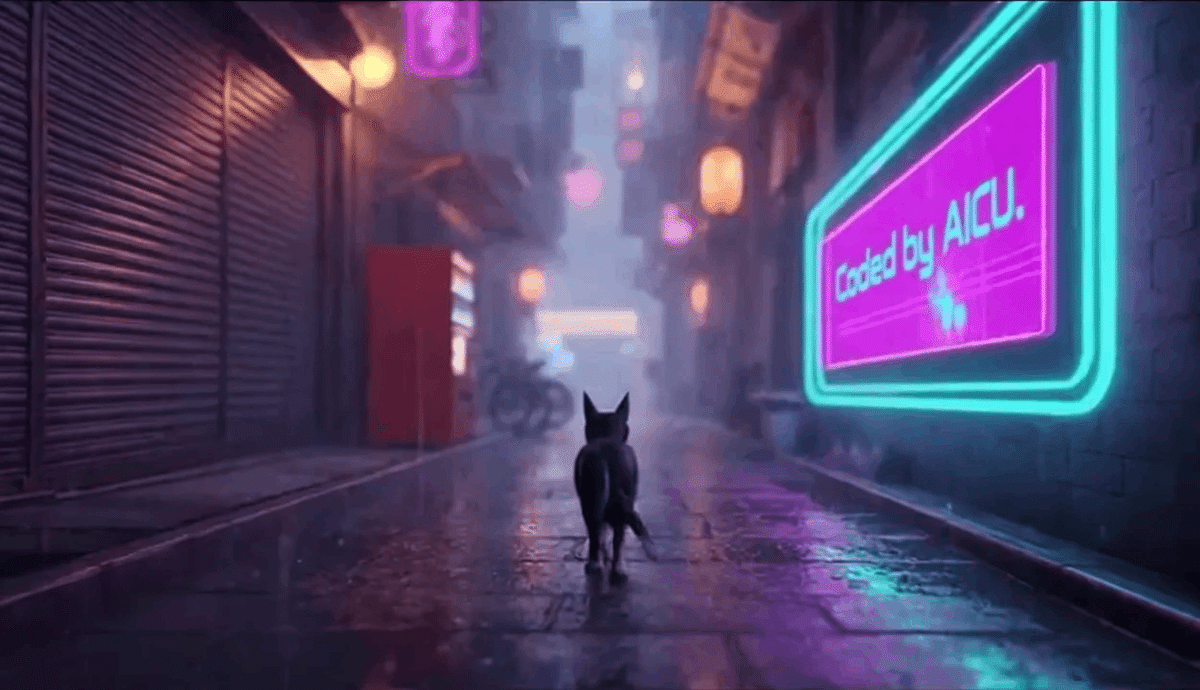
You can also create a bot that constantly posts cute cat videos!
Coded by Sora2 API! #Sora2 pic.twitter.com/RJp4GWwj3i
— AICU - Creating Creators (@AICUai)
Loading tweet component...
?ref_src=twsrc%5Etfw">October 7, 2025I will create a bot that makes Saki Noir (AiCuty), who is in charge of X@AICUai of AICU, tweet cute videos every hour. Please share your opinions with us.
AICU AIDX Lab conducts research and development on image generation systems, video generation systems, content development, character IP development, interactive systems, and copyright resolution technology. We are currently looking for researchers and partner companies as we expand our business. We are also looking for partner companies in the AICU Media division. Materials are here. Please feel free to contact us.
[PR] Held from 20:00 today! AICU Lab+ Study Session (Free) From filmmaking to NanoBanana to video generation with ComfyUI! Why not learn directly from creators who are proficient in everything from cute characters to engineering?
The following is a translation of official documents.
Video generation with Sora
Video Generation with Sora - SoraAPI
You can now create, iterate, and manage videos using the SoraAPI. Sora is OpenAI's latest frontier in generative media and a cutting-edge video model that can create highly detailed and dynamic clips with audio from natural language or images. Based on years of research into multimodal diffusion models, and trained on diverse visual data, Sora brings a deep understanding of 3D space, motion, and scene continuity to text-to-video generation. Sora is opening these features to developers for the first time, enabling programmatic video creation, augmentation, and remixing. The API provides five endpoints, each with different functions.
Create Video (CreateVideo) : Start a new rendering job from a prompt. You can optionally specify a reference input or remix ID.
Get Video Status (GetVideoStatus) : Get the current state of the rendering job and monitor its progress.
Download Video (DownloadVideo) : Once the job is complete, fetch the completed MP4 file.
List Videos (ListVideos) : Enumerate videos with pagination for history, dashboards, or organization.
Delete Videos (DeleteVideos) : Delete individual video IDs from OpenAI's storage.
Two Models
The second generation Sora model has two systems, each tailored to different use cases.
Sora 2
sora-2 is designed with speed and flexibility in mind. It is ideal for the exploration phase where you need quick feedback rather than perfect fidelity, while experimenting with tone, composition, visual style, etc.
It generates good quality results quickly, making it suitable for quick iterations, concept creation, and rough cuts. sora-2 often performs more than adequately in social media content, prototypes, and scenarios where delivery time is more important than ultra-high fidelity.
Sora 2 Pro
sora-2-pro produces higher quality results. It is the appropriate choice when production quality output is required.
sora-2-pro takes longer to render and is more expensive to run, but produces more refined and stable results. It is ideal for any situation where visual accuracy is critical, such as high-resolution cinematic footage, marketing assets, etc.
Generate a video
Video generation is an asynchronous process.
When you call the POST /videos endpoint, the API returns a job object containing the job id and initial status.
You can poll the GET /videos/{video_id} endpoint until the status transitions to completed, or as a more efficient approach, you can use a Webhook (see the Webhook section below) to automatically receive a notification when the job is completed.
Once the job reaches the completed state, you can retrieve the final MP4 file at GET /videos/{video_id}/content.
Starting a Rendering Job
First, call POST /videos with a text prompt and required parameters. The prompt defines the creative look and feel, such as subject, camera, lighting, and movement, and parameters such as size and seconds control the resolution and length of the video.
Create Video JavaScript Sample
import OpenAI from 'openai';

const openai = new OpenAI();

let video = await openai.videos.create({
 model: 'sora-2',
 prompt: "A video of the words 'Thank you' in sparkling letters",
});

console.log('Started video generation: ', video);
The response is a JSON object with a unique id and an initial status such as queued or in_progress. This means the rendering job has started.
JSON Return
{
 "id": "video_68d7512d07848190b3e45da0ecbebcde004da08e1e0678d5",
 "object": "video",
 "created_at": 1758941485,
 "status": "queued",
 "model": "sora-2-pro",
 "progress": 0,
 "seconds": "8",
 "size": "1280x720"
}
Guardrails and Limitations
The API has some content restrictions.
Only content suitable for viewers under the age of 18 (settings to bypass this restriction will be available in the future).
Copyrighted characters or music will be rejected.
Real people, including public figures, cannot be generated.
Input images containing human faces are currently rejected.
To avoid generation failures, ensure that prompts, reference images, and transcripts comply with these rules.
Effective Prompt Creation
For best results, describe the shot type, subject, action, setting, and lighting. For example:
"Wide shot of a child flying a red kite in a grassy park, golden hour sunlight, camera slowly pans up."
"Close-up of a steaming cup of coffee on a wooden table, morning light streaming through the blinds, shallow depth of field."
This level of specificity makes it easier for the model to produce consistent results without inventing unnecessary details. For more advanced prompting techniques, see the dedicated Sora2 Prompt Guide.
Sora 2 Prompting Guide | OpenAI Cookbook Think of prompting like briefing a cinematographer who has ne cookbook.openai.com
Monitor Progress
Video generation takes time. Depending on the model, API load, and resolution, a single rendering can take several minutes.
To manage this efficiently, you can poll the API to request status updates or receive notifications via Webhooks.
Polling the Status Endpoint
Use the id returned by the creation call to call GET /videos/{video_id}. The response shows the current status, progress rate (if available), and errors for the job.
Typical states are queued, in_progress, completed, and failed. Poll at appropriate intervals (e.g. every 10-20 seconds), use exponential backoff if necessary, and provide feedback to the user that the job is still in progress.
Polling the Status Endpoint
import OpenAI from 'openai';

const openai = new OpenAI();

async function main() {
 const video = await openai.videos.createAndPoll({
 model: 'sora-2',
 prompt: "A video of the words 'Thank you' in sparkling letters",
 });

 if (video.status === 'completed') {
 console.log('Video completed successfully: ', video);
 } else {
 console.log('Failed to create video. Status: ', video.status);
 }
}

main();
Response Example:
{
 "id": "video_68d7512d07848190b3e45da0ecbebcde004da08e1e0678d5",
 "object": "video",
 "created_at": 1758941485,
 "status": "in_progress",
 "model": "sora-2-pro",
 "progress": 33,
 "seconds": "8",
 "size": "1280x720"
}
Using Webhooks for Notifications
Instead of repeatedly polling the job status with GET, you can register a Webhook to be automatically notified when video generation is complete or fails.
Webhooks can be configured in the Webhook settings page. When a job is finished, the API issues one of two event types: video.completed and video.failed. Each event includes the ID of the job that triggered it.
Webhook Payload Example: JSON
{
 "id": "evt_abc123",
 "object": "event",
 "created_at": 1758941485,
 "type": "video.completed", // or "video.failed"
 "data": {
 "id": "video_abc123"
 }
}
Getting Results and Downloading MP4
Once the job status is completed, get the MP4 with GET /videos/{video_id}/content. This endpoint streams binary video data and returns standard content headers so you can save the file directly to disk or pipe it to cloud storage.
MP4 Download
 import OpenAI from 'openai';
import fs from 'fs';

const openai = new OpenAI();

let video = await openai.videos.create({
 model: 'sora-2',
 prompt: "A video of the words 'Thank you' in sparkling letters",
});

console.log('Started video generation: ', video);

let progress = video.progress ?? 0;

while (video.status === 'in_progress' || video.status === 'queued') {
 video = await openai.videos.retrieve(video.id);
 progress = video.progress ?? 0;

 // プログレスバーの表示
 const barLength = 30;
 const filledLength = Math.floor((progress / 100) * barLength);
 // ターミナル出力用のシンプルなASCIIプログレス表示
 const bar = '='.repeat(filledLength) + '-'.repeat(barLength - filledLength);
 const statusText = video.status === 'queued' ? 'Queued' : 'Processing';

 process.stdout.write(`\r${statusText}: [${bar}] ${progress.toFixed(1)}%`);
 await new Promise((resolve) => setTimeout(resolve, 2000));
}

// プログレス行をクリアして完了を表示
process.stdout.write('\n');

if (video.status === 'failed') {
 console.error('Failed to generate video');
 return;
}

console.log('Video generation completed: ', video);
console.log('Downloading video content...');

const content = await openai.videos.downloadContent(video.id);
const body = content.arrayBuffer();
const buffer = Buffer.from(await body);

fs.writeFileSync('video.mp4', buffer);
console.log('Wrote video.mp4');
Now you have the final video file ready for playback, editing, or distribution. The download URL is valid for up to 24 hours after generation. If you need long-term storage, quickly copy the file to your own storage system.
Download Support Assets
For each completed video, you can also download a thumbnail and a sprite sheet. These are lightweight assets that are useful for previews, scrubbers, or catalog displays. Use the variant query parameter to specify what you want to download. The default is variant=video for MP4.
# Download Thumbnail
curl -L "https://api.openai.com/v1/videos/video_abc123/content?variant=thumbnail" \
 -H "Authorization: Bearer $OPENAI_API_KEY" \
 --output thumbnail.webp

# Download Sprite Sheet
curl -L "https://api.openai.com/v1/videos/video_abc123/content?variant=spritesheet" \
 -H "Authorization: Bearer $OPENAI_API_KEY" \
 --output spritesheet.jpg
Use Image References
You can guide the generation with an input image, which serves as the first frame of the video. This is useful when the output video needs to maintain the look of a brand's assets, characters, or specific environments. Include the image file as the input_reference parameter in the POST /videos request. The image must match the resolution (size) of the target video.
Supported file formats are image/jpeg, image/png, and image/webp.
curl -X POST "https://api.openai.com/v1/videos" \
 -H "Authorization: Bearer $OPENAI_API_KEY" \
 -H "Content-Type: multipart/form-data" \
 -F prompt="She turns around and smiles, then slowly walks out of the frame." \
 -F model="sora-2-pro" \
 -F size="1280x720" \
 -F seconds="8" \
 -F input_reference="@sample_720p.jpeg;type=image/jpeg"
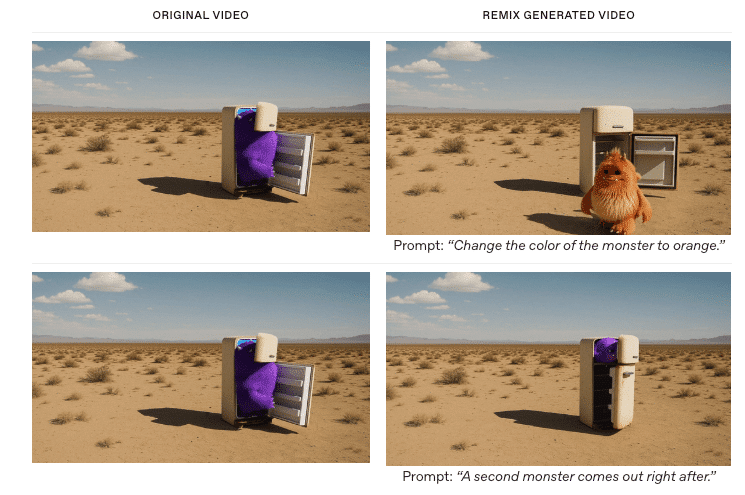
Using the remix feature allows you to retrieve an existing video and make targeted adjustments without regenerating everything from scratch. Providing the remix_video_id of a completed job and a new prompt describing the changes, the system applies the changes while reusing the structure, continuity, and composition of the original video. This is most effective when making a single, well-defined change. Because smaller, more focused edits retain more of the original fidelity and reduce the risk of artifacts.
curl -X POST "https://api.openai.com/v1/videos/<previous_video_id>/remix" \
 -H "Authorization: Bearer $OPENAI_API_KEY" \
 -H "Content-Type: application/json" \
 -d '{
 "prompt": "Change the color palette to teal, sand, and rust, and add warm backlighting."
 }'
Remixes are particularly valuable for iteration because they can improve parts that are already working without discarding them. By limiting each remix to one clear adjustment, you can explore variations in atmosphere, palette, or staging while stabilizing visual style, subject consistency, and camera framing. This makes it much easier to build a refined sequence through small, reliable steps.
(Image Example) Video Generated by Remix
Prompt: "Change the monster's color to orange."
Prompt: "Immediately after, another monster appears."
Maintaining the Library
Enumerate videos using GET /videos. This endpoint supports optional query parameters for pagination and sorting.
# default
curl "https://api.openai.com/v1/videos" \
 -H "Authorization: Bearer $OPENAI_API_KEY" | jq .

# With parameters
curl "https://api.openai.com/v1/videos?limit=20&after=video_123&order=asc" \
 -H "Authorization: Bearer $OPENAI_API_KEY" | jq .
Use DELETE /videos/{video_id} to remove videos that are no longer needed from OpenAI's storage.
curl -X DELETE "https://api.openai.com/v1/videos/[Replace with YOUR_VIDEO_ID]" \
 -H "Authorization: Bearer $OPENAI_API_KEY" | jq .