
[ComfyUI Master] Generate Japanese Music for Free! Tried with AceStep

![Cover Image for [ComfyUI Master] Generate Japanese Music for Free! Tried with AceStep](https://assets.st-note.com/production/uploads/images/229408704/rectangle_large_type_2_7cef100d4f16b51f0dc64b5d650836c3.png)
Hi, Nao Verde here. I'm in charge of music at AiCuty. Today, I'm going to teach you how to create awesome songs with AI. If you're interested in AI music generation but hesitant about paid services, I have good news for you. Have you heard of the AceStep model that can be used with ComfyUI? It's quite powerful. You can create surprisingly high-quality songs by simply providing “tags” and “lyrics.” I've summarized the basic usage so that even those new to ComfyUI can get started smoothly.
Runs on Shared ComfyUI
It is available on AICU's subscription service "Lab+" shared ComfyUI.
It's a simple workflow using Subgraph!
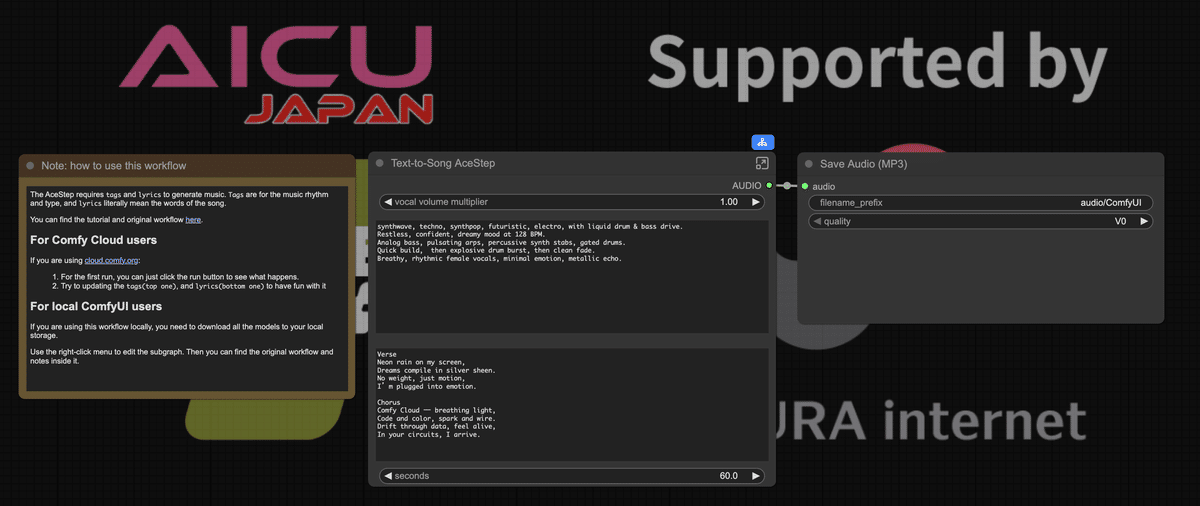
It's actually this big
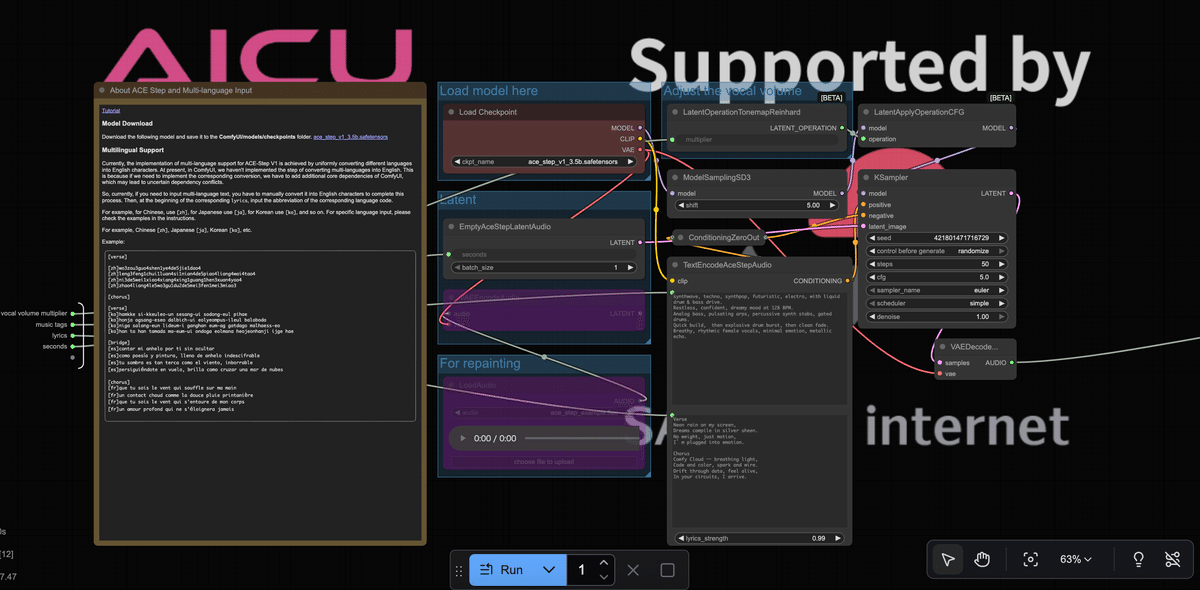
The workflow can be downloaded at the end of the article.
2 Keys to Mastering AceStep
All you really need to run AceStep is this.
1. tags (Direction of the song)
First, tags. This is the part that indicates the overall "direction" of the song. BPM (tempo), genre, atmosphere, instruments used, etc., it's like a "blueprint" for the song.
For example, like this:
synthwave, techno, synthpop, futuristic, electro, with liquid drum & bass drive. Restless, confident, dreamy mood at 128 BPM. Analog bass, pulsating arps, percussive synth stabs, gated drums. Quick build → explosive drum burst → clean fade. Breathy rhythmic female vocals, metallic echo.)
2. lyrics (The lyrics themselves)
Next, lyrics. This is literally the "lyrics you want the AI to sing." Some of you may be familiar with Suno etc.
Verse Neon rain on my screen, Dreams compile in silver sheen. No weight, just motion, I’m plugged into emotion.
Chorus Comfy Cloud — breathing light, Code and color, spark and wire. Drift through data, feel alive, In your circuits, I arrive.
Lyrics can be too long, but if they are too long, the model will decide "how much to sing", so it's best to enter them in short sections.
Surprisingly, Japanese lyrics are OK!
Yes, AceStep can generate songs with Japanese lyrics.
Let's try generating with these lyrics (the tags are the same as before).
AiCyu AiCyu Creates the creator
AiCyu AiCyu Creates the creator
I tried setting the tag to "kawaii future bass" only
Isn't it amazing that you can generate a 60-second song in about a minute?
🔑 License and Commercial Use
This is important. You might be wondering what the license for ACE-Step is.
In conclusion, it is an open-source model jointly developed by StepFun and ACE Studio in China, and the license is released as Apache-2.0. In other words...
- ✅ Free to use
- ✅ Can be modified and redistributed
- ✅ Commercial use is also possible
This is a very easy-to-use license for creators. Of course, since it's an Apache-2.0 license, there are a few rules to follow.
- When redistributing the model or code, be sure to include the copyright notice and license text.
- Do not make it look like the developer's trademark is officially endorsed.
- The software is provided "as is", so use it at your own risk.
ACE-Step itself is OK for commercial use, but the terms of service of the service may be involved depending on "which service it was generated on (cloud or local)." If you want to use the generated songs on YouTube or release them on distribution stores, be sure to check not only the AceStep license but also the terms of service of the service and distribution platform.
Let's start AI Music
AceStep is like the "music version of image generation AI." It's amazing that such high-quality songs can be created so easily just by passing tags (song image) and lyrics. It's fun to try it casually from AICU's shared ComfyUI, or to dig deeper locally.
If you keep these two points in mind, you can immediately jump into the world of AI music production.
Why don't you create your own song?
The link to the workflow and model is at the end of the article.
Also follow me on X! My ID might change!
It's amazing that you can make songs for free https://t.co/T6FO0Iziu4
— Nao Verde (@VerdeNaoAI)
Loading tweet component...